How to build an app with AI: a guide for non-technical founders (2026)
To build an app with AI without coding, name one problem, write a one-page spec, pick an AI app builder (Lovable, Bolt, Base44 or Replit, about $16 to $25 a month on entry plans), build one screen and one flow at a time, and test with five real users. AI gets you a working first version in days. It does not handle accounts, payments, security review or going live on its own. Bring in a developer before the app holds real customer data or takes real money.
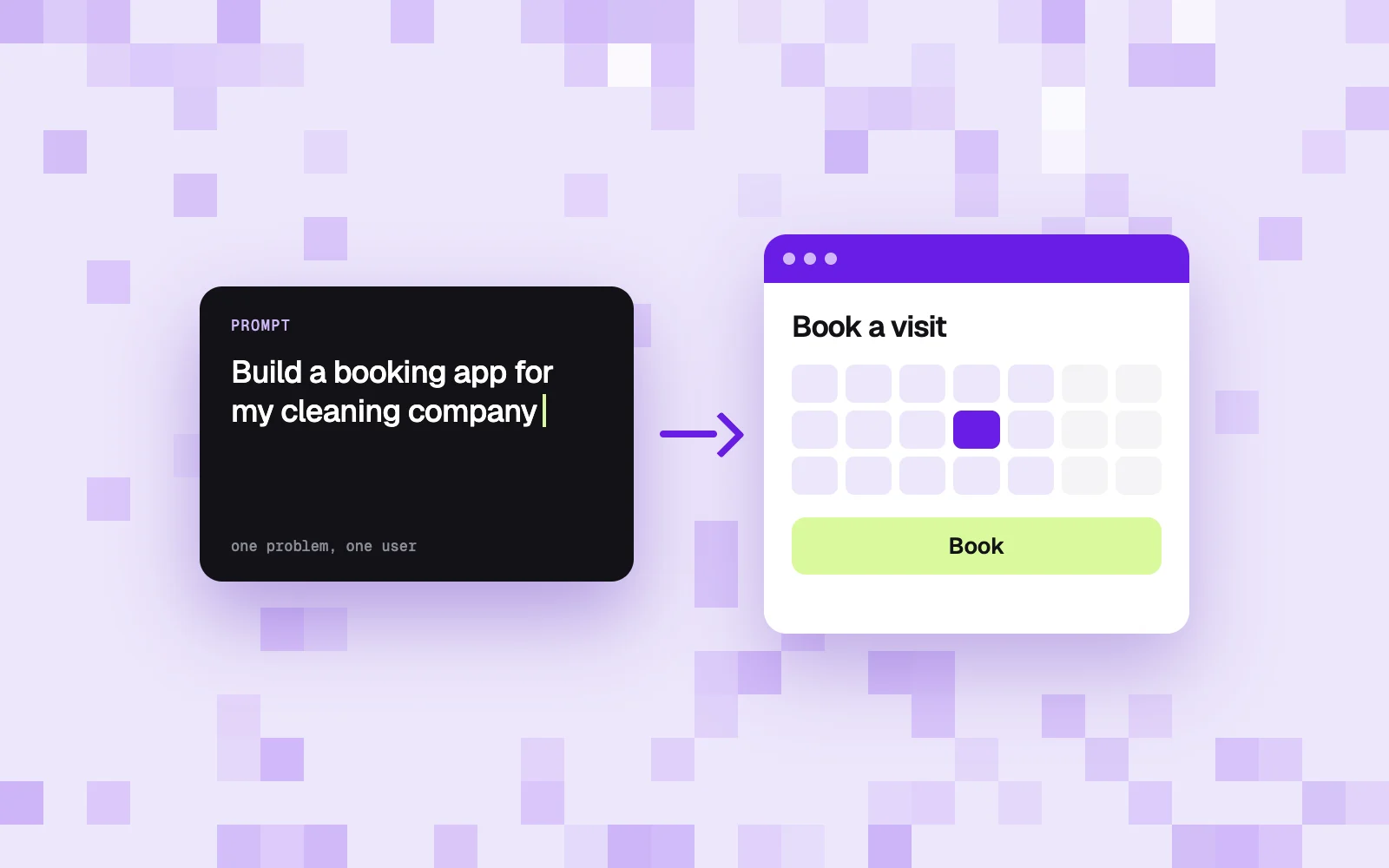
If you want to know how to build an app with AI and you have never written code, the short version is this: describe one problem in plain language to an AI app builder, let it generate a first version, then improve it one small request at a time. A weekend is enough for a prototype you can click through. Getting from that prototype to something customers can safely pay for is a different job, and most guides skip it.
I read the pages that rank highest for this question in the US: Tech.co, Website Builder Expert, Google Cloud, Bubble and Base44. Three come from companies that sell an AI app builder, and two earn a commission when you sign up for one. None of them shows what was left for a human to do after the AI finished.
We've been on both sides: founders who had to validate our own product ideas, and the team that designs and builds products for clients. Max Miskow built his own product, Podium, with an AI coding assistant, and kept a build diary. This guide uses that diary to show where AI saves weeks and where it stops.
What it means to build an app with AI
Building an app with AI means describing what you want in plain language and letting an AI model write the code, the database and the screens. You steer by reading the result and asking for changes. The popular name for this is vibe coding. The person doing it needs a clear idea of the product far more than knowledge of a programming language.
Two families of tools exist.
What is an AI builder? An AI app builder is a website where you type a description and get a running app with hosting included. Lovable, Bolt, Base44 and Replit belong here. You never see a terminal. Lovable describes itself as software that lets you "chat to instantly build websites and web apps, with no technical knowledge needed" (Lovable pricing page).
AI coding assistants such as Claude Code and Cursor work inside a real code project on your computer. They are what professional developers use. In the 2026 Stack Overflow Developer Survey (30,903 responses), 73% of respondents said they use coding assistants and agents daily, and Claude Code (66%) and GitHub Copilot (59%) led among coding agents.
| AI app builder | AI coding assistant | |
|---|---|---|
| Examples | Lovable, Bolt, Base44, Replit | Claude Code, Cursor |
| Where you work | In the browser, in a chat | In a code project on your computer |
| Hosting and database | Included or one click | You set them up |
| Skills you need | Clear writing, patience | Reading code, basic developer tools |
| Best for | Prototype, internal tool, simple MVP | Products that must grow and be maintained |
| Main risk | You can't judge what was built | You need a developer to drive it well |
How to build an app with AI: 7 steps
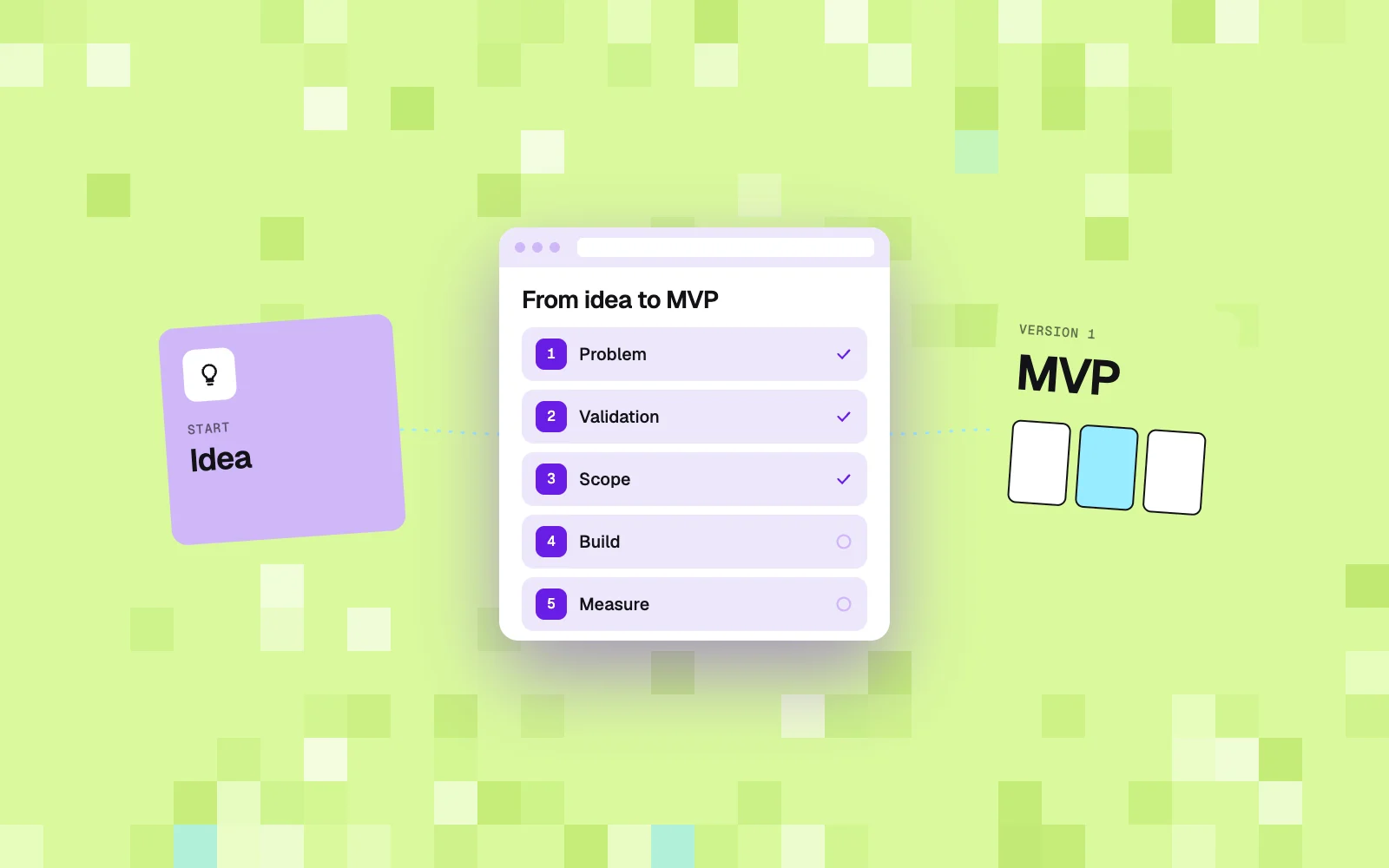
To build an app with AI, work in this order: problem, spec, tool, data, small slices, real users, review. The first two steps involve no AI tool at all, and they decide most of the result. A vague idea gives you a vague app, only faster.
- Name one problem and one user. "Customers of my cleaning company can't book a recurring visit without calling" is a problem. "An app for my business" is a wish. Write down what the person does today and what it costs you.
- Write a one-page spec. List the three to five things a user must be able to do, the data you store (customers, bookings, invoices) and what is out of scope. This page becomes your first prompt. A product roadmap can wait, a one-page scope cannot.
- Pick one tool and stay with it. Use the tables below. Switching builders mid-project usually means starting over.
- Start with the data, then one flow. Ask for the data model first ("a customer has many bookings, a booking has a date, an address and a status"). Then ask for a single flow from start to finish, such as "a customer books a visit".
- Build in small slices. One request, one change, one check. Long prompts that ask for ten features at once produce apps where three of them quietly don't work. Save a version before every larger change.
- Test with five real users. Sit next to them and say nothing. Every place they stop is your next request to the AI.
- Get a review before real data. Before the app stores customer details or takes payments, have a developer review accounts, permissions, payments and backups. The security section below explains why.
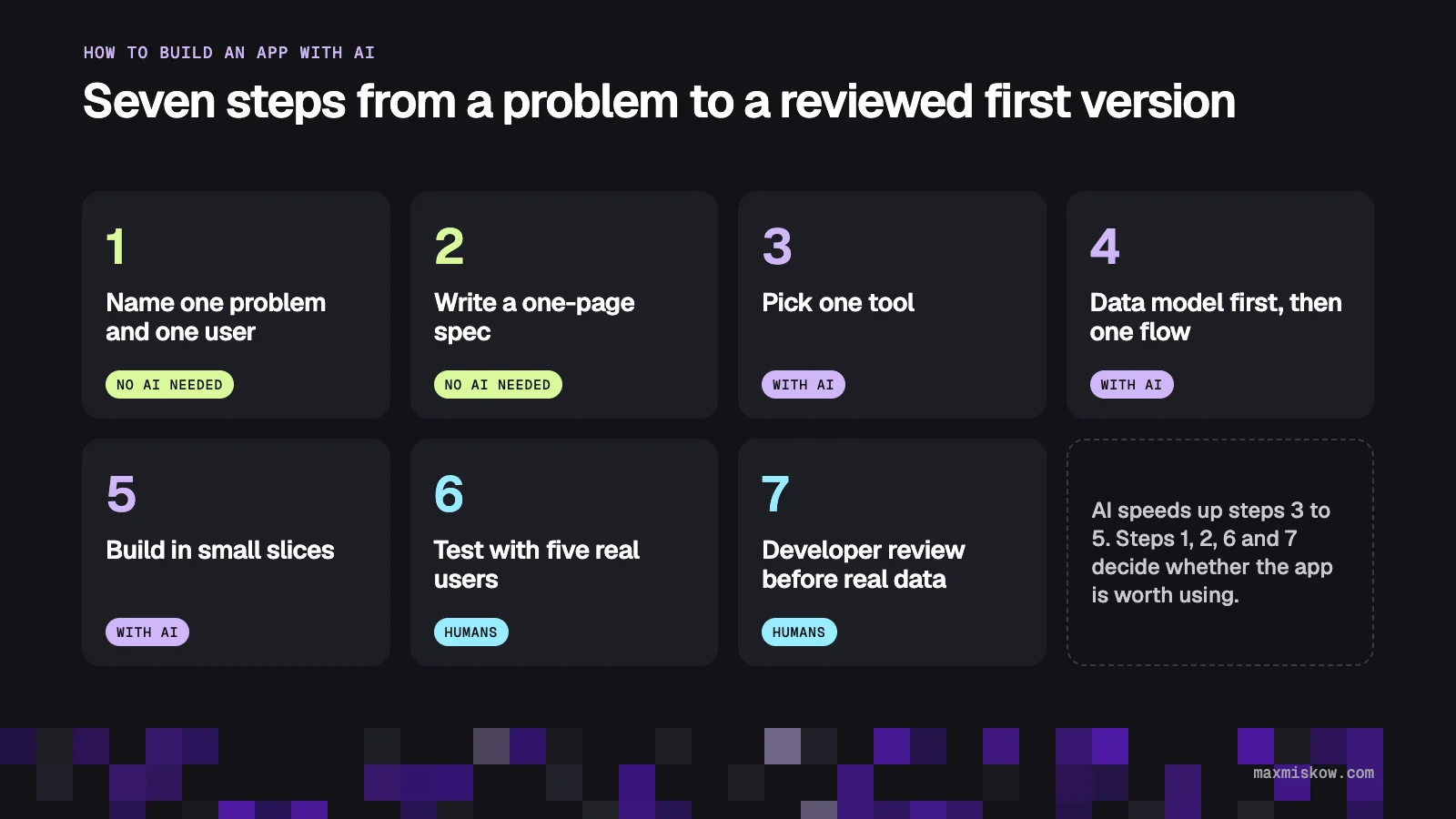
Bubble, which sells its own builder, puts the limit honestly in its guide: AI can get you about 80% of the way to a working app, and the last 20% often turns out to be the hardest part. Steps 6 and 7 are that last 20%.
Best way to build an app with AI: tools and prices compared
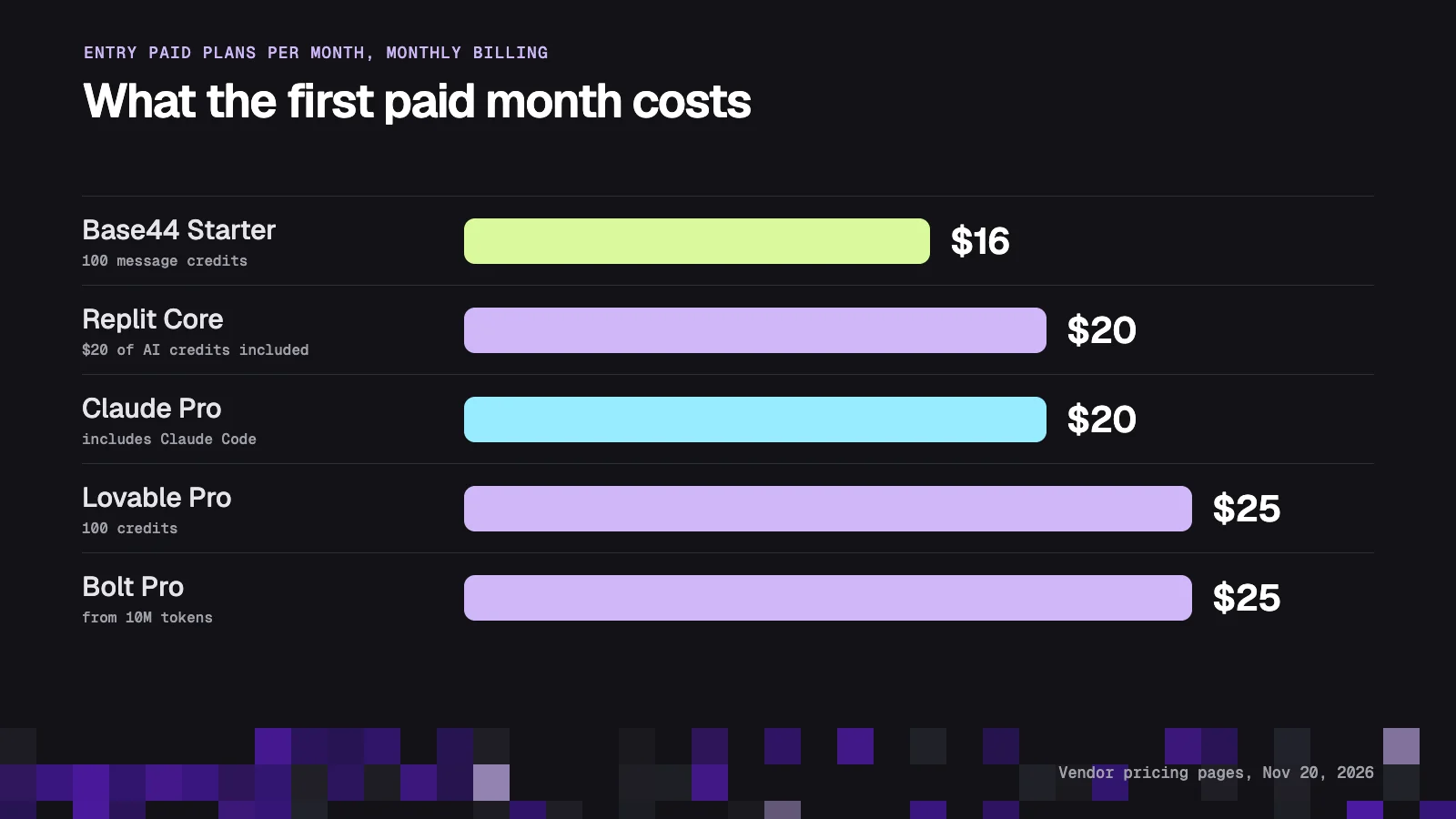
The best way to build an app with AI as a non-technical founder is an AI app builder with hosting and a database included: Lovable, Bolt, Base44 or Replit. Entry paid plans cost $16 to $25 a month. Claude Code and Cursor are stronger tools, but they assume someone on the team can read code.
Prices below come from each vendor's own pricing page, checked on November 20, 2026, with monthly billing in US dollars. All of them change often, so open the page before you pay.
| Tool | Type | Free plan | Entry paid plan | What you pay for | Code is yours |
|---|---|---|---|---|---|
| Lovable | App builder | 5 build credits a day, up to 30 a month | Pro, $25/mo, 100 credits | Credits per message | Yes, per its pricing FAQ |
| Bolt | App builder | 1M tokens a month, 300K a day | Pro, $25/mo, from 10M tokens | Tokens | Yes, GitHub integration |
| Base44 | App builder | 25 message credits a month | Starter, $16/mo, 100 message credits | Message and integration credits | Yes, GitHub export |
| Replit | App builder and workspace | Starter: daily AI credits up to a monthly cap | Core, $20/mo with $20 of AI credits | Effort-based pricing per checkpoint | Yes, GitHub sync |
| Claude Code | Coding assistant | No | Claude Pro, $20/mo ($17 with annual billing) | Subscription with usage limits | Yes, files live on your computer |
| Cursor | Coding assistant | Limited requests | Plus, $8/mo, Premium $30/mo | Shared AI usage pool, third-party models billed separately | Yes, files live on your computer |
Lovable's Pro price is listed at $0.25 per credit in its documentation, which gives $25 for 100 credits. The pricing page shows local currency outside the US.
Three things in this table matter more than the monthly price.
Credits are the real cost. Lovable publishes examples: changing a button color costs 0.50 credits, adding sign-up and login costs 1.20, a landing page with images 1.70. At around one credit per request, 100 credits is on the order of a hundred requests. Debugging burns credits too, because every "that still doesn't work" is a message.
Pricing models differ. Bolt counts tokens and reads your project files on each request, so large projects cost more per change. Replit charges by effort: a complex build costs more than a simple request, and Replit asks for confirmation before paid work starts (Replit billing docs).
Ownership is fine everywhere, in theory. Every tool above lets you take the code out. Whether a developer wants to continue from that code is a separate question. Ask one early.
Which tool for which job
| You want to | Start with | Why |
|---|---|---|
| Show an idea to customers or investors this week | Lovable or Bolt | Fastest path from a prompt to a shareable link |
| Build an internal tool for your team (orders, schedules, a dashboard) | Base44 or Replit | Database, logins and hosting in one place |
| Sell a product with accounts and subscriptions | App builder for the prototype, then a developer with Claude Code or Cursor | Payments, permissions and data need review |
| Add a feature to software you already have | A developer with Claude Code or Cursor | Existing code needs someone who can read it |
| Publish in the App Store or Google Play | Check store support first, plan for a developer | Store accounts, review and updates are manual work |
Can you build an app with AI for free?
Yes, you can build an app with AI for free up to a prototype, and no further. Free plans give you enough messages for a first version and a public link. They run out during corrections, and they keep the builder's branding or limits on your published app.
| Free plan | What you get (November 20, 2026) | Where it ends |
|---|---|---|
| Lovable Free | 5 build credits a day, capped at 30 a month | About 30 small changes a month, no custom domain |
| Bolt Free | 300K tokens a day, 1M a month | Bolt branding on sites, daily limit |
| Base44 Free | 25 message credits, 100 integration credits a month | 25 messages is one short session |
| Replit Starter | Daily AI credits up to a monthly cap, Lite build only | "Made with Replit" badge, full builds need Core |
A sensible plan: learn how to build an app with AI for free during week one, find out which tool you get along with, then pay for one month of the entry plan. A full first version rarely fits in free limits, because most of the work is fixing, not generating.
How to build an app with Claude or Claude Code
You can build an app with Claude in two ways. In the Claude chat app, you ask for a small tool and get an interactive artifact you can share. With Claude Code, you work in a real project folder, and Claude reads files, writes code, runs it and fixes errors. Claude Code is included in the Pro plan at $20 a month (Claude pricing).
For a non-technical founder the honest advice is this. Use the chat app for calculators, simple forms and one-screen tools. If you want to learn how to build an app with Claude Code, expect a learning curve: you need a code editor, hosting, a database account and a way to keep versions (GitHub). Claude will explain each of these and do most of the typing.
A workflow that works when you build an app with Claude Code: paste your one-page spec and ask for a plan before any code, build one stage at a time with a short test for each, and keep a diary file that Claude updates after every session. Then ask for a list titled "what you must do yourself" (accounts, keys, domain, payments). That list is where the Podium example below comes from.
What AI gets wrong: security and the last 20%
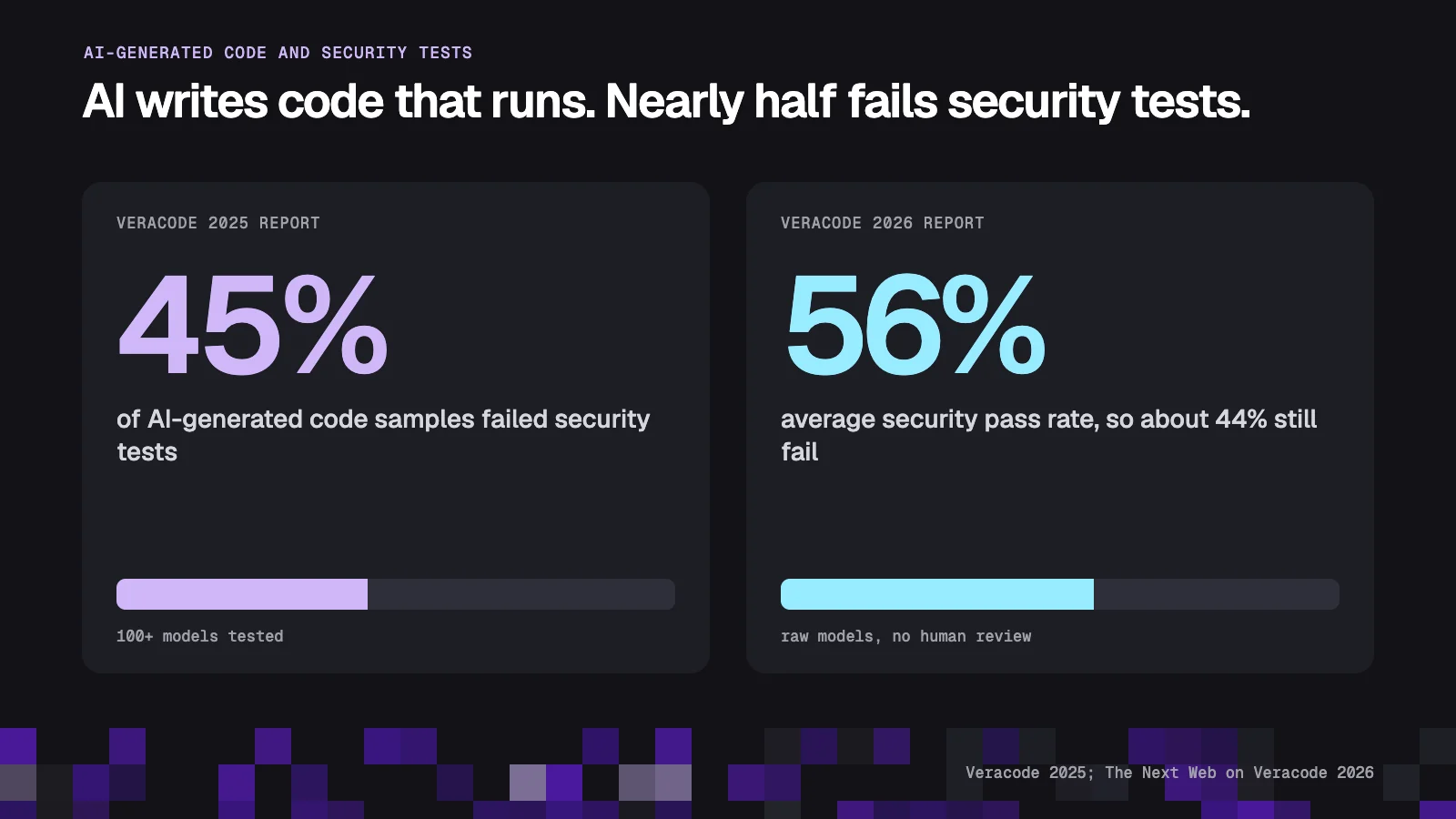
AI writes code that runs. It does not reliably write code that is safe. Veracode tested more than 100 AI models and reported that 45% of the code samples failed security tests and introduced a vulnerability from the OWASP Top 10, the standard list of the most serious web application risks (Veracode 2025 GenAI Code Security Report).
The 2026 edition did not show progress. According to The Next Web's summary of Veracode's 2026 report, the average security pass rate sits at 56%, against 55% at the start, so models still fail about 44% of the time. One caveat from the same article matters: the tests ran on raw models with no human review, so this is the rate at which flaws are generated, not the rate at which they reach production. Review is what closes the gap.
Professional developers treat AI the same way. In the 2026 Stack Overflow survey, 48% said they trust AI when they can easily validate the answers, and only 16% extend that trust to most tasks. A non-technical founder uses the tool precisely because they cannot validate the code.
What tends to go wrong in AI-built apps, in the order it usually hurts:
- Permissions. Any logged-in user can see another customer's data by changing a number in the address bar.
- Secrets. A payment or email key ends up in code that the browser can read.
- Payments. Checkout works in test mode. Taxes, invoices, refunds and failed cards were never built.
- Data loss. No backup exists, and a careless request to the AI rewrites the database.
- The loop. The AI fixes one bug and brings back another, and credits burn while nothing improves.
None of these show up in a demo.
AI app builder or developer: what to choose
Choose an AI app builder alone when the app is a prototype or an internal tool with no sensitive data. Choose a developer who works with AI when the app takes money, stores customer data or has to run for years. For most small companies the best route is both, in sequence: you prototype, a professional rebuilds or hardens what proved useful.
| You with an AI builder | Developer using AI | Both in sequence | |
|---|---|---|---|
| Time to first clickable version | Days | 2 to 3 weeks for a small project | Days |
| Monthly tool cost | $16 to $25 on entry plans | Included in the project | $16 to $25, then project price |
| Who checks security | Nobody | The developer | The developer, before launch |
| Fits | Prototype, demo, internal tool | Product with payments and customer data | An idea you want to test before you invest |
| Main risk | It works until it matters | You pay before the idea is tested | The prototype may be rebuilt, not reused |
If you are wondering how to build an app with no coding experience, or how to build an app from scratch without betting the company on it, the third column is the answer. Your prototype is the best brief a developer can get. It shows screens, flows and data better than any document, and it makes the first conversation much shorter.
This is how we work with companies outside tech. A current client runs several home-service businesses and wants one app where customers can order any of their services, connected to the field-service software the company already uses. Before anyone builds that, the work is deciding what the first version must do and what can wait. If a simpler tool solves the problem, we say so: our guide to a custom app for a small business lists the cases where off-the-shelf software is enough.
Example: what AI did and what a human had to do on Podium
On Podium, the AI coding assistant had first versions of all seven planned stages ready a week before the first stage was due, and the human work took the following weeks. Podium is Max's own product: it tracks how a website shows up in AI answers and writes articles for it. The plan had stages T1 to T7 scheduled from September 9 to October 21, 2026.
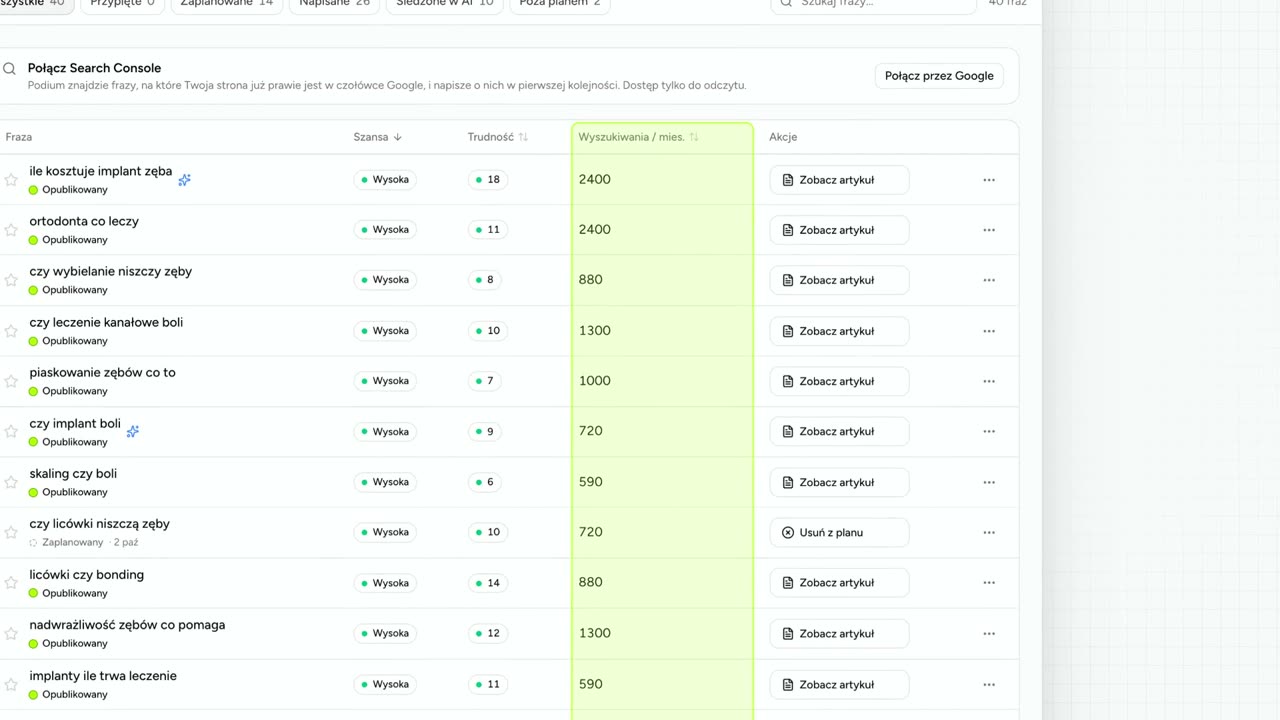
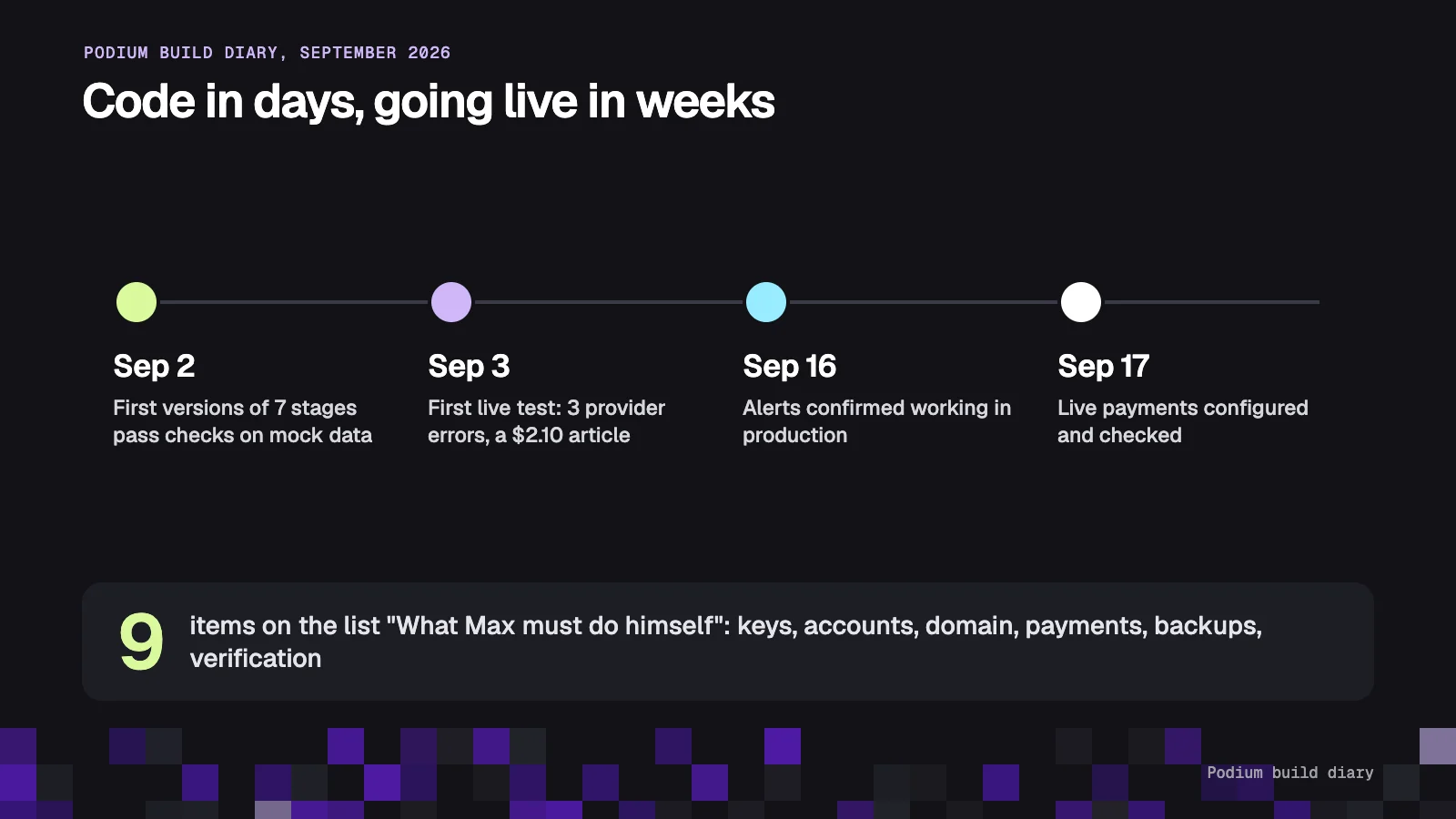
The build diary entry for the night of September 2 records that all seven stages had been checked locally on mock data: a database schema of 20 tables, sign-in, onboarding, the scan engine, the article engine, publishing to three CMS platforms and a weekly email. That is the part every AI demo shows.
The next entries are less glamorous. The first live test on September 3 hit three failures in one evening: one AI provider returned a rate-limit error, another had retired the model the code called, a third had no credits on the account. The first real article cost $2.10 across three attempts, so article writing moved to a cheaper model and each site got a default AI budget of $2 a day. The publishing adapters were, in the diary's words, written from documentation and not yet tested on a live account.
| What the AI assistant did | What a human had to do |
|---|---|
| Wrote the database schema (20 tables) and migrations | Decide what the first version includes and what waits |
| Built sign-in, onboarding, scan, article and publishing code | Create accounts and paste API keys for every provider |
| Wrote smoke tests on mock data for each stage | Run the first test on a real site and read the failures |
| Wrote payment code for a 3-day trial with a card | Set up the payment account, tax registration and invoice details |
| Wrote alerting code for failed jobs | Create the alert bot and the monitoring checks |
| Wrote the deployment script | Point the domain, set up production sign-in, set up off-site backups |
| Proposed model choices | Set the budget after seeing the $2.10 article |
The diary has a section titled "What Max must do himself". It lists nine items, from API keys to Google's verification of search data access, which it calls the longest track. None of them is writing code. Alerts were confirmed working on September 16 and live payments were configured and checked on September 17, two weeks after the code "worked".
The lesson for a founder: budget your time for the right column. AI compressed the typing. Decisions, accounts, money and checking stayed human work.
What an app built with AI costs in the first three months
Three months of building with an AI app builder costs $48 to $75 in entry subscriptions, plus extra credits when you debug a lot. The numbers below are simple multiplication of list prices checked on November 20, 2026. They leave out your own time, which is the largest cost by far.
| Scenario | Tools | 3-month tool cost | What it leaves out |
|---|---|---|---|
| Prototype to show customers | Base44 Starter | $48 | Extra credits, custom features |
| Prototype to show customers | Lovable Pro or Bolt Pro | $75 | Credit or token top-ups |
| Internal tool for a team | Replit Core | $60 | Usage above the $20 monthly credits |
| Founder learning Claude Code | Claude Pro | $60 | Hosting, database, domain |
| Product with customers | Builder for 1 month, then a developer | $16 to $25, then a fixed project price | Running costs after launch |
For the last row we give a range after a first call and a fixed price before each stage, so the cost of the build is known before work starts. The MVP section of our home page describes how a first version is scoped.
Running costs continue after launch: hosting, the database, email sending, and AI usage if the app itself calls a model. In Podium, a scan of 22 search phrases cost $0.10.
Checklist before real customers use your AI-built app
Before real customers touch an app you built with AI, confirm ten things. If you cannot answer one of them, that item is the brief for a developer review.
- Can user A see user B's data? Test it with two accounts.
- Where are the secret keys, and can the browser read them?
- Is there a daily backup stored outside the app, and has anyone restored from it once?
- What happens when a payment fails or a customer asks for a refund?
- Who receives an alert when something breaks at night?
- Is the code in your own GitHub account?
- Do you own the domain, the hosting account and the database account?
- Does the app have a privacy policy that matches what it stores?
- Is there a spending limit on every AI and cloud account?
- Can you name the one number that tells you the app is working for customers?
To talk through your idea, you can ask for a free report with ideas for your company or book a 30-minute call.
Frequently asked questions
Can I build an app with AI with no coding experience?
Yes. AI app builders such as Lovable, Bolt, Base44 and Replit turn a plain-language description into a working web app with a database and hosting. You need a clear problem, a one-page spec and patience for many small corrections. You will need a developer's review before the app stores customer data or takes payments.
Can I build an app with AI for free?
You can build a prototype for free. On November 20, 2026, Lovable's free plan gave 5 build credits a day (up to 30 a month), Bolt gave 1 million tokens a month and Base44 gave 25 message credits a month. Free limits usually run out during corrections, so plan for one paid month at $16 to $25.
How long does it take to build an app with AI?
A clickable first version takes a weekend to a week. A version that real customers can use safely takes several more weeks, because accounts, payments, backups, alerts and testing are manual work. On Podium, first versions of all seven planned stages passed checks on mock data by September 2, 2026, and live payments were configured on September 17.
Is an app built with AI secure?
Not by default. Veracode's 2025 report found that 45% of AI-generated code samples failed security tests, and its 2026 report showed an average pass rate of 56%. Those tests had no human review. A developer review of permissions, secrets, payments and backups before launch is the practical fix.
How do I build an app and make money from it?
Start from a problem people already pay to solve, not from the app. Charge from the first version, even a small monthly fee, because payment is the only reliable proof of demand. Building the app with AI lowers the cost of testing an idea. It does not create demand.
Who owns the code when I build an app with AI?
You do with the tools in this guide. Lovable states that you own your code and projects, Base44 offers GitHub export of the full source, and Claude Code and Cursor work on files on your own computer. Keep the code in your own GitHub account.
When should I hire a developer instead of using an AI app builder?
Hire one when the app handles payments, stores personal data, connects to systems your business depends on, or has to run for years. Also hire one when the AI starts looping on the same bug. A prototype you built yourself makes that engagement shorter, because it shows exactly what you want.